NWPBanner
Welcome! NWPphotoforum.com
Previous Thread
Next Thread
Print Thread
Mexican Hairless #19369
12/23/08 09:58 AM
12/23/08 09:58 AM
Joined: Feb 2005
Manhattan, New York, New York
James Morrissey Offline OP
I
James Morrissey  Offline OP
I
Carpal Tunnel

Joined: Feb 2005
Manhattan, New York, New York
Hey Guys,

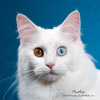
This was an interesting guy that I recently photographed named Morgan. I still have a bunch that I have not processed from the shoot, but I thought these were fun.

Now, for the problem. For some reason, these shots are still looking a bit red on my screen when I post them here. In Photoshop, they are looking perfect with a beautiful white backdrop. Thoughts as to what could be causing this? Obviously the strobe on the top right was running a tad hotter than the others, which I can fix in PS. However, the color shift is a bit annoying.

James


Re: Mexican Hairless [Re: James Morrissey] #19370
12/23/08 10:10 AM
12/23/08 10:10 AM
Joined: May 2008
Virginia, USA
Jim Poor Offline
Addict
Jim Poor  Offline
Addict

Joined: May 2008
Virginia, USA
I've noticed that several images, especially with a lot of white, look red or pinkish on this forum. I'm wondering if it isn't the green color scheme messing with our perception a bit or making things seem even redder than they are.

That said, I pulled the first one into CS4 and there is a bit of a red cast. I can repost the results if you like, but this is what I did:

Open in CS4.
Duplicate background layer. Then FILTER>Blur>Average.
Added Levels Adjustment layer to the now solid color. Picked the gray eyedropper and clicked on the color to turn it gray.

Turned off visibility of the blurred layer and adjusted the opacity of the Levels Layer to what is my best guess on how the image should look having not seen the dog myself. I settled on 49%.

Re: Mexican Hairless [Re: Jim Poor] #19371
12/23/08 01:04 PM
12/23/08 01:04 PM
Joined: Nov 2008
Kansas
psmith Offline
Pooh-Bah
psmith  Offline
Pooh-Bah

Joined: Nov 2008
Kansas
They are slightly pinkish. The proof though will be in the prints.

If you pull the image into Photoshop, choose the Eyedropper, choose a sample size of say 11 x 11 and run through the background you'll find

Red: 242
Green: 241
Blue: 236

The numbers change as you move around but the blue channel is consistantly 5-8 points less than the other two. For pure white / gray you want them within a couple or three points of each other.

Nice shots of a very rare and unusual pup.

Re: Mexican Hairless [Re: psmith] #19372
12/29/08 05:56 PM
12/29/08 05:56 PM
Joined: Feb 2005
Manhattan, New York, New York
James Morrissey Offline OP
I
James Morrissey  Offline OP
I
Carpal Tunnel

Joined: Feb 2005
Manhattan, New York, New York
Thanks all. I have a bunch more that I have not processed yet. I was torn on whether or not to clone out the scratches on the skin. I have a great profile shot that shows off his mohawk a bit.

Oddly enough, on my computer monitor at the office, the colors look pretty perfect...so, it looks right in PS on my own computer, and here in the office, but not when I am just viewing in FireFox. Thoughts?

James

Re: Mexican Hairless [Re: James Morrissey] #19373
12/29/08 06:04 PM
12/29/08 06:04 PM
Joined: May 2008
Virginia, USA
Jim Poor Offline
Addict
Jim Poor  Offline
Addict

Joined: May 2008
Virginia, USA
What browser do you use in the office?

Are you using the color managed version of Firefox at home?

Re: Mexican Hairless [Re: Jim Poor] #19374
12/29/08 06:08 PM
12/29/08 06:08 PM
Joined: Feb 2005
Manhattan, New York, New York
James Morrissey Offline OP
I
James Morrissey  Offline OP
I
Carpal Tunnel

Joined: Feb 2005
Manhattan, New York, New York
Jim

Thanks for the super-fast reply. At risk of looking totally ignorant, what do you mean by 'Color Managed Version' of FireFox? What is that? I never heard of it. I am using 2.0.1.2 in the office and 3.x at home (I HATE 3.x...but for other reasons).

Thanks
James

Re: Mexican Hairless [Re: James Morrissey] #19375
12/29/08 07:51 PM
12/29/08 07:51 PM
Joined: May 2008
Virginia, USA
Jim Poor Offline
Addict
Jim Poor  Offline
Addict

Joined: May 2008
Virginia, USA
With web viewing the way colors are interpreted by the browser can have a major effect on how an image is seen. That's why the "safest" color space to use for web posting is sRGB.

If, for example, I forget to convert from ProPhotoRGB to sRGB the colors will look like crap when presented on the web to most people. The people that have browsers capable of reading the assigned color space will show the photo more accurately.

Safari has been the only color managed browser for a long time, but Firefox just came out a color managed version. I'll run down and post a before / after to better illustrate what I'm trying to say in a bit.

Best,
Jim


Who's Online Now
0 registered members (), 629 guests, and 2 spiders.
Key: Admin, Global Mod, Mod
Newest Members
Susitna Sled Dog, David Vitor, CTiefisher, DrSuse BlueDevil, airphotog
3319 Registered Users
Forum Statistics
Forums6
Topics641
Posts1,031
Members3,319
Most Online7,966
May 21st, 2026

Copyright 2005 - 2020 Nature, Wildlife, and Pet Photography Forum. "NWPPhotoforum" and "nwpphotoforum.com" are the property of Nature, Wildlife, and Pet Photography Forum. All Rights Reserved. Wild Coyote Studio, New York Pet Photographer

Powered by UBB.threads™ PHP Forum Software 7.7.1
(Release build 20190129)
PHP: 5.6.40-1+hw4 Page Time: 0.029s Queries: 14 (0.008s) Memory: 0.9249 MB (Peak: 1.9729 MB) Data Comp: Zlib Server Time: 2026-05-30 07:37:31 UTC